How flowbook is built and how to use it
flowbook is a Python library that splits data processing into small steps, describes their arrangement in a JSON plan, and runs it. Its core depends only on pydantic, and it runs locally with no DB or server. This page covers, in order: the ideas behind it, where it helps with real examples, what a plan can change, its building blocks, and how to add steps.
The ideas behind flowbook — lightweight, readable, easy to open up for configuration, easy for AI to write
flowbook aims to be not a large platform but a small tool for organizing routine processing at hand. The ideas are these four.
- Lightweight: the core depends only on pydantic. Install it and you can call it from Python right away, and plan JSON can also be run from the CLI. Excel, DB, and HTTP API support are added through extras only when you use them
- Readable: the content of the processing lives in steps (one Python class each), and the procedure lives in plans (short JSON). Reading a plan tells you what is done and in what order
- Easy to open up for configuration: the key points of the procedure collect in the plan and input JSON. JSON fits easily into on-screen forms and tables, so you can let non-engineers change things like the files to read, mapping tables, and thresholds from a screen
- Easy for AI to write: plans are short JSON, and each step's inputs and outputs can be listed with
flowbook steps show(extradev). Having an LLM write a plan, choose a plan, or write a step skeleton is all straightforward
Where it helps, with real examples
It suits work where you run the same shape of processing many times, changing the target or procedure a little each time. Once processing is split into steps, even if targets increase or the procedure changes, all you rewrite is the plan and the input.
Here are three real examples.
Example 1: Read multiple Excel files, transform them, and output one Excel file
Read multiple Excel files, match and transform them, and output a single Excel file. Reading, matching, transforming, and writing each become a step. flowbook makes three things easier.
- The files and sheets to read are passed as plan inputs, so even when files change each month or each deal, you can use the same plan as is
- When one more Excel file needs to be read, add one read step to the plan. Existing steps are left untouched
- Transformation rules (such as field mapping tables) can be kept in JSON, so changing a rule doesn't have to mean changing code
Example 2: Produce quotes and invoices from DB records
Contract and work records are kept in a DB, and quotes and invoices are issued from them. Issuing is a plan in the order "read from the DB → finalize the document content → render the form → check → save to the DB → read back and verify", with one plan each for quotes and invoices. DB reads and writes use the built-in SQL steps, and only the processing specific to the documents is in custom steps. flowbook makes three things easier.
- The invoice plan only adds reads at the start (the latest quote, that month's work, the previous invoice, and so on); the steps from rendering through verification are the same ones the quote uses
- The form format (HTML or Excel) is chosen by a plan input. With the same plan, you can change just the output format
- Because checking is a step, a mismatched total or a missing required field stops the run before saving and file output
Example 3: Fetch information from the web periodically and notify on changes
Periodically fetch web pages, feeds, PDFs, and so on, and post a chat notification if something has changed since last time. Each source has a five-step plan, "fetch → parse → judge → notify → record", and the scheduled run only needs to call the plan. flowbook makes three things easier.
- Every source gets the same shape of plan. What you write per source is only the fetch, parse, and judge steps; the notify and record steps are shared
- Because fetching and parsing are separate steps, you can feed saved real HTML or PDF files as input and test just the parse step without a network connection
- The record step runs only after notification has finished. If notification fails, the previous state remains, and the next run sends it again
What a plan can change — procedure and input
By rewriting a plan, you can change these two things without touching code.
| What changes | Examples |
|---|---|
| The flow's content | Adding, removing, or swapping steps to run, and the order of execution |
| Values passed to each step | Inputs that correspond to function arguments. They can be written as constants, or refer to an earlier step's output or a runtime input |
You can also change only the runtime input without changing the plan itself. This is how you run the same plan many times with different files to read or different sources to fetch.
A plan is an array of steps, and the order of the array is the execution order. For each step, write a name unique within the plan (name), the kind of step to use (op), and the inputs (inputs).
{
  "steps": [
    {"name": "sum", "op": "add", "inputs": {"x": "@a", "y": "@b"}},
    {"name": "twice", "op": "double", "inputs": {"x": "@sum/sum"}}
  ]
}
An input value starting with @ is a reference. @a is the input a passed at runtime, and @sum/sum is the output sum of the earlier step sum. Values that don't start with @ are passed as constants as is.
The built-in steps include Excel reading and writing (with automatic detection of table ranges), CSV reading, SQL execution, table validation and diffing, table joins and aggregation, and value conversion through mapping tables. See the list with flowbook steps list and each step's inputs and outputs with flowbook steps show <step name> (both are extra dev commands). Fixed procedures can be saved as plans and loaded by name with the built-in step load_plan.
How the engine, session, plan, and steps relate
There are five building blocks.
| Building block | Role |
|---|---|
| Step | One processing component. It declares the types of its inputs and outputs and is registered by name |
| Plan | A configuration describing the sequence of steps to run and each step's inputs |
| Artifact | A value stored as a step's input or output. All data passes through here |
| Engine | Holds the registered steps and the place where artifacts are kept (the store). You create one at the start |
| Session | The unit of one run. It places inputs, runs the plan, and returns the results |
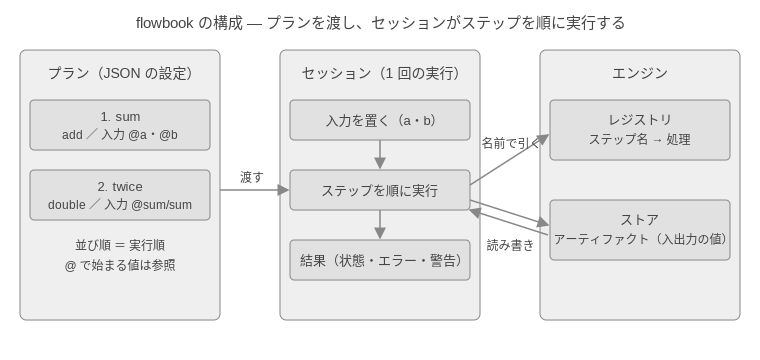
A step receives inputs and returns outputs as a dict. The session saves the outputs to the store, and later steps take them as inputs. Steps never call each other directly, so reordering or swapping them takes only the plan.
How to add a step — one class and one line to register
Steps are written as Python classes. Declare the input and output types in inner classes, and return the output dict from __call__. The following example adds a step double that doubles the input x, and runs the plan above.
from flowbook import (
    Engine, Registry, InMemoryArtifactsStore, discover_steps, register_from_steps, step,
)
from flowbook.core.registry.base_op import BaseOp, BaseInputs, BaseOutputs

@step("double")
class Double(BaseOp):
    class Inputs(BaseInputs):
        x: int | float

    class Outputs(BaseOutputs):
        out: int | float

    def __call__(self, inputs, store):
        return {"out": inputs["x"] * 2}

registry = Registry()
discover_steps(registry)            # 組み込みのステップ
register_from_steps()(registry)     # @step を付けたステップ
engine = Engine(store=InMemoryArtifactsStore(), registry=registry)

plan = {
    "steps": [
        {"name": "sum", "op": "add", "inputs": {"x": "@a", "y": "@b"}},
        {"name": "twice", "op": "double", "inputs": {"x": "@sum/sum"}},
    ]
}

with engine.create_run() as session:
    session.put_input("a", 1)
    session.put_input("b", 2)
    info = session.exec_plan(plan_config=plan)
    print(info.status)                              # succeeded
    print(session.get(info.artifacts_written[-1]))  # 6
info holds the run's status, the artifacts written, errors, and warnings. When you bundle steps into a separate package, write a registration function under the entry point (flowbook.steps) in pyproject.toml, and discover_steps will pick them up just by installing the package.
Installing and the entry points for running
pip install flowbook
flowbook doctor
The core depends only on pydantic, and the code example above runs with this. Storage defaults to memory. Plan JSON can also be run from the CLI without writing code.
flowbook run --plan plan.json --input a=1 --input b=2 --json
The result (status, errors, warnings, and each step's outputs) comes back as JSON. flowbook doctor suggests any missing extras. Other features are added through extras when you need them.
| What to add | extra | Use |
|---|---|---|
| Tables and Excel | table |
Read and write Excel tables without pandas |
| pandas | pandas |
Handle DataFrames as values |
| SQL | sql |
SQL steps |
| PostgreSQL | postgres |
Keep artifacts and run records in a DB |
| HTTP API | fastapi |
Serve plan execution and the step list over HTTP |
| LLM | ai |
Steps that call an LLM |
| Development CLI | dev |
Inspection commands such as flowbook steps list |
Created 2026-11-05 · Updated 2026-11-07 · Machine-translated from the Japanese original.